Grip op Sport does a lot: members, classes, memberships, invoices, competitions, payroll, accounting. That is great once everything is in place, but setting it up takes time. The manual is extensive: 124 screens, almost 900 sections of explanation, in 11 languages. You just need to know where to look.
That is why we are building an AI assistant you can ask, inside the software, how something works. You type "how do I set the membership fee for youth members?" and get a short answer, with a link to exactly the screen where you arrange it.
No training our own model: RAG
We do not train our own AI. That is expensive, and every change to the software would need new training. Instead we use RAG (Retrieval-Augmented Generation). For every question we first look up the parts of the manual that fit, and pass those to the language model. The model writes the answer based on those sources only. If it is not in there, it says so honestly.
The advantage: when we update the manual, the assistant knows right after the next indexing run.
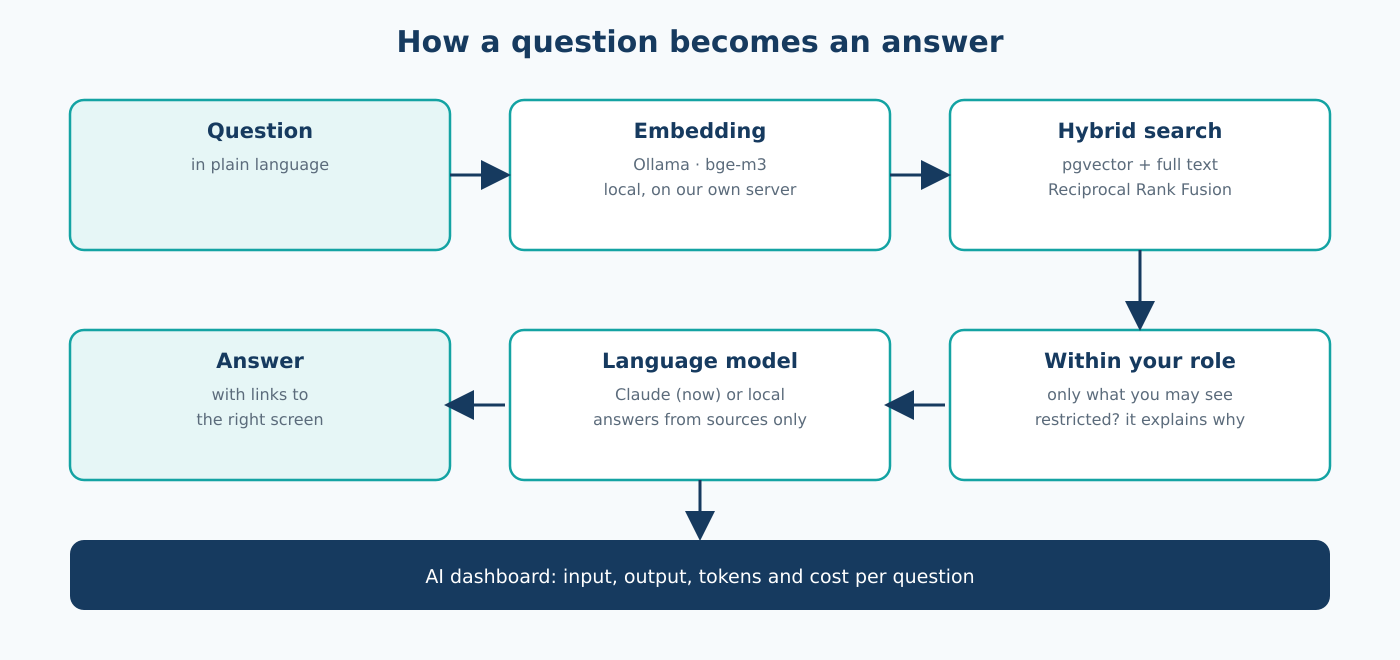
How a question becomes an answer
- Embedding. The question is turned into a vector with bge-m3, a multilingual model running locally in Ollama. A question in Polish also finds the Dutch explanation.
- Hybrid search. In PostgreSQL with pgvector we search on meaning (vectors) and on words (full text) at the same time, and merge the results with Reciprocal Rank Fusion. That way "where do I set the fee" also finds the screen where that word literally appears.
- Within your role. Only parts about screens you have access to go along as sources. Ask about something your role cannot reach, and the assistant explains which right is needed and who arranges it.
- Language model. The model writes a short, practical answer in your language, with Markdown links to the screens.
- Shown safely. HTML from the model is never executed. Only links within the software itself stay clickable.
Searching takes about 0.2 seconds. With Claude Haiku the full answer is there within a few seconds.
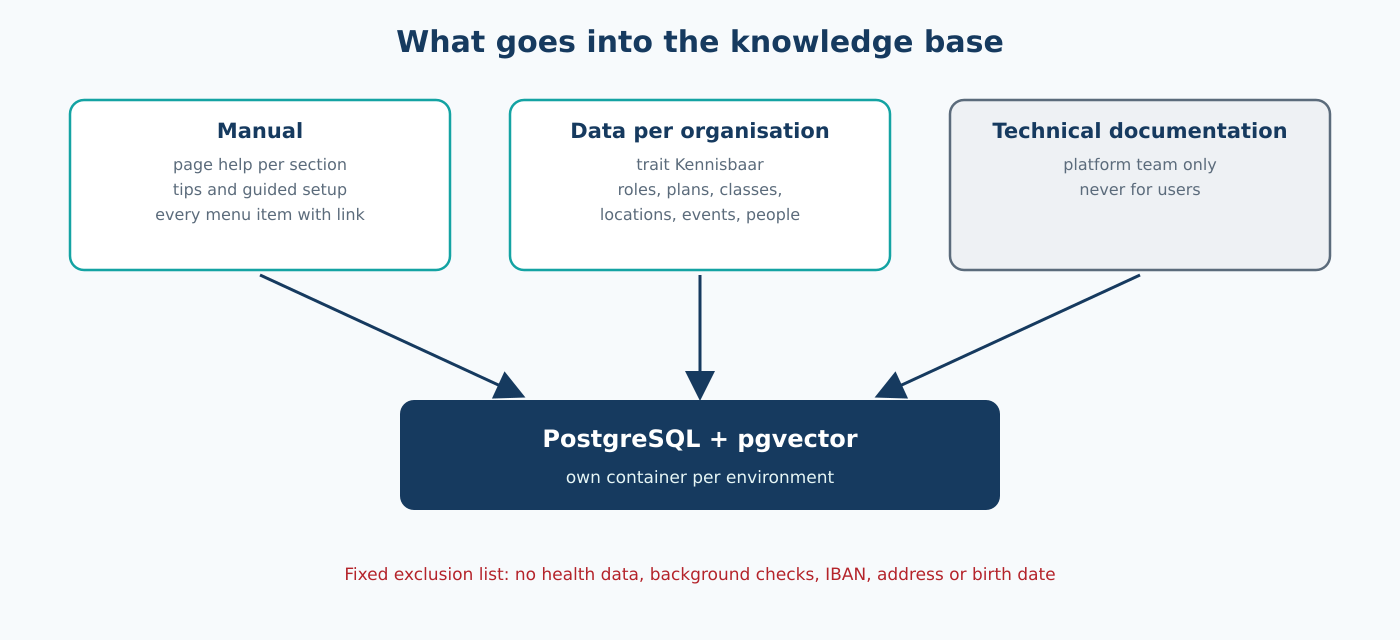
What goes into the knowledge base
- The manual: the explanation per screen, the tips, the guided setup and every menu item with its link. Around 1,200 pieces in total.
- Data of your own organisation: roles with their rights, memberships, classes, locations, events and people. A model joins in by using the trait
Kennisbaarand declaring which fields may go in. That way the assistant can say which membership you have or which role may create invoices. - Technical documentation: only for our own platform team, never for users.
Two rules keep this safe. Search always stays within your own organisation. And the vector database only delivers candidates: the content that goes to the model comes fresh from the regular database, with the same rights check as in the app. What you cannot see in the app, the assistant cannot see either. Sensitive data such as health information, background checks, IBAN, address and date of birth is on a fixed exclusion list and never goes in.
Measuring what it does
Especially at the start we want to see exactly what happens. For every question we store the literal input to the model, the search hits with their score, the answer, the tokens and the cost. In the admin there is an AI dashboard per organisation with totals per day, and a thumbs up or down shows where the manual is still missing something.
On top of that there is a fixed set of 50 questions with the screen that belongs in the answer. The first measurement: for 42 of the 50 questions, search found the right screen. Every question that goes wrong in practice is added. That way we will compare models on facts.
For the user, the assistant appears as a small figure in the bottom right corner. Click it and it opens as a panel next to the page, like an AI helper in Word or Excel. The buttons on the screen stay within reach.
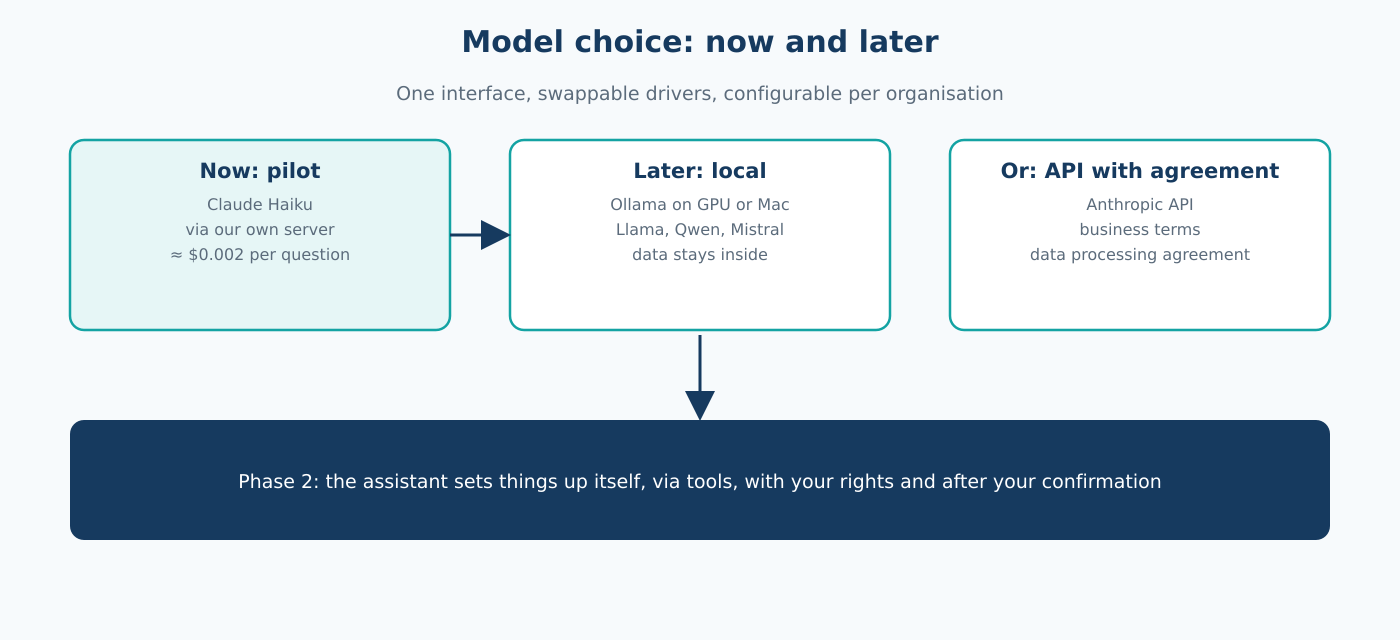
Model choice: now and later
The language model sits behind a single interface with swappable drivers. Which driver an organisation uses is configured per organisation. Search, rights and links do not change when we switch models.
- Now, the pilot: Claude Haiku by Anthropic, via our own server. Fast and cheap: about $0.002 per question.
- Later, local: an open source model such as Llama, Qwen or Mistral via Ollama, on a machine with a solid graphics card or a Mac. Then nothing leaves our own environment. The embeddings already run locally today.
- Or via an API with agreements: the Anthropic business API with a data processing agreement, for organisations that prefer that.
The assistant is a separate module. We switch it on per organisation, and the organisation decides per role who may use it.
Next step
Right now the assistant shows the way. In the next phase it will also set things up itself: "create a youth membership of 12.50 per month". That will go through the same actions as in the app, with your rights, and only after your confirmation. Everything ends up in the audit trail.
We build it with open source parts as much as possible: PostgreSQL, pgvector, Ollama, Laravel and Docker. Fun work.
#AI #RAG #pgvector #PostgreSQL #Ollama #Embeddings #Claude #LLM #OpenSource #Laravel #SaaS #SportsTech #GripOpSport